
1. After updating and logging into your MiSalud App, in the home screen, scroll all the way down.
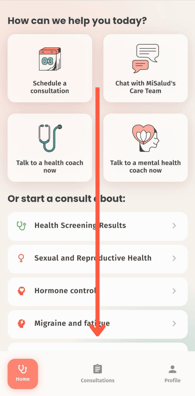
2. Click the button that says "Ad up to 3 family members or friends to MiSalud".
.png?width=196&height=399&name=ENG%20(2).png)
3. Fill in the requested data in the 3 fields available with the family member or friend's information and click the button "Invite this person to MiSalud"
.png?width=197&height=401&name=ENG%20(3).png)
4. When clicking it you'll see new sign with short instructions on whats next. Read them and then click "Understood" to send the code to your family member o friend you want to invite.
This will redirect you to your text messaging app; once there, you just need to press send, and you're done!
.png?width=198&height=403&name=ENG%20(4).png)
5. When returning to MiSalud App you'll have two options presented.
If you want to invite one more person click on "Invite one more person".
If you're done adding people for now just click "Go home" to go back to the initial home screen.
.png?width=202&height=411&name=ENG%20(5).png)